

I first heard about the Razer Naga V3 Pro on Reddit, and after reading about it, I decided to give it a try. I bought it specifically for World of Warcraft, and so far, it has been a lot better than I expected. The software is easy to use, setting up my mouse binds is straightforward, and the onboard memory means I rarely need to keep the app running. For something I bought to make playing WoW easier, it has done exactly what I wanted.
Key Takeaways
- I first heard about the mouse on Reddit.
- I bought it specifically for World of Warcraft.
- Razer Synapse has been easy to use and has not given me the problems I expected from reading other people’s complaints.
- I can customize my mouse binds and save settings to onboard memory.
- I rarely need to keep the software running once everything is configured.
- I have no regrets about buying it.
What Is the Razer Naga V3 Pro?
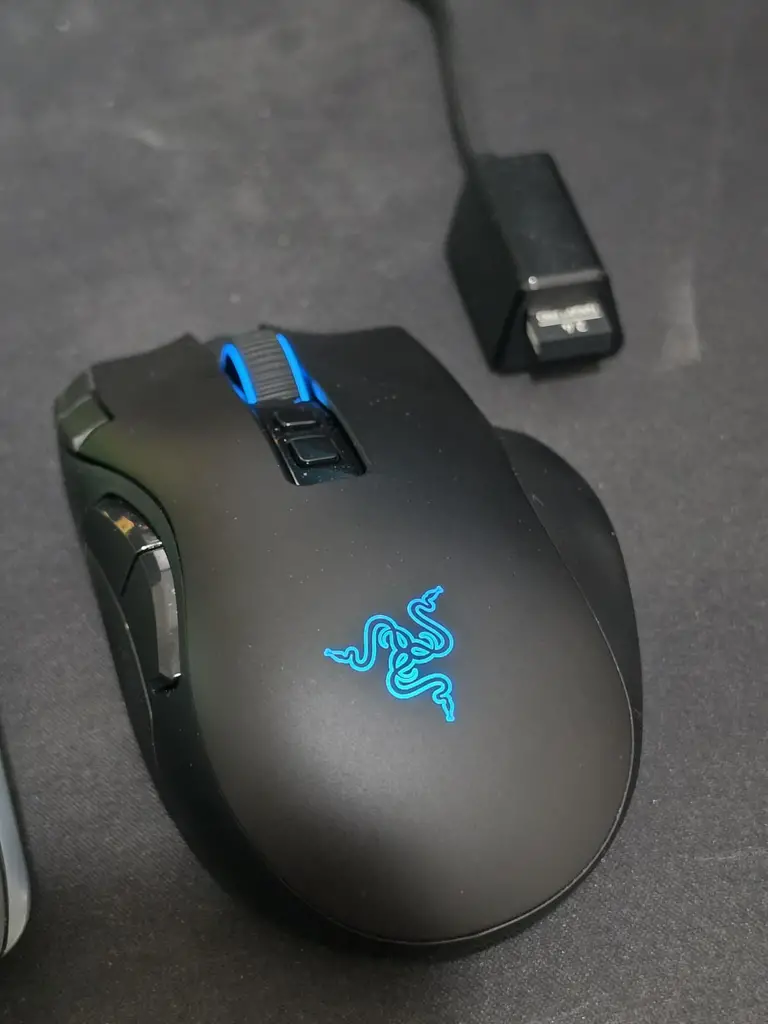
The Razer Naga V3 Pro is a wireless gaming mouse designed particularly for MMO players who need quick access to lots of abilities, spells, macros and other in-game commands.
Its main selling point is the interchangeable side plates. You can switch between a 12-button layout for MMOs, a six-button layout for games such as MOBAs and battle royales, and a two-button layout for FPS games or everyday use. The mouse can accommodate up to 23 programmable buttons, depending on which side plate you use.
It also supports wired USB, 2.4GHz wireless and Bluetooth connectivity. Other features include a customizable scroll wheel, adjustable DPI settings, and onboard memory for storing up to five profiles. For a game like World of Warcraft, where you can end up juggling a ridiculous number of abilities, having extra controls within reach can make a real difference.
Why I Bought It
I first came across the Razer Naga V3 Pro on Reddit. I was looking for a mouse that would work well for World of Warcraft, and the Naga caught my attention because of its additional buttons and customization options.
WoW was the main reason I bought it. I wanted to be able to assign commands to the mouse rather than constantly relying on my keyboard for everything. When you are playing an MMO, having your abilities and other frequently used commands within easy reach is appealing. However, I had seen people complain about Razer’s software, particularly around bugs and reliability. That made me a little wary because I did not want to spend money on a gaming mouse only to end up fighting with the application every time I wanted to change a setting.
I decided to give it a chance anyway, and I am glad I did.
My Experience With the Razer Naga V3 Pro
The first thing I noticed was that the mouse was much better than I expected it to be. I had heard about it on Reddit, done enough reading to become interested, and bought it for a specific purpose. I was not expecting to be blown away by the software, but that has turned out to be one of the better parts of the experience.
Razer Synapse Has Been Surprisingly Easy to Use
One thing I kept seeing people complain about was Razer’s software. I went into this purchase aware that some users had problems with it, so I was prepared for a potentially frustrating setup process. That has not been my experience at all.
Razer Synapse has been extremely easy to use for me. I can customize my mouse binds without having to struggle through a complicated process, and setting things up for my own playstyle has been straightforward.
I know software experiences can differ between users and systems, so I am not going to claim that nobody has problems with Synapse. But based on my own experience, the complaints I had read did not turn out to be an issue for me.
That is a relief because customization is a big part of why I bought this mouse in the first place. If setting up the buttons had been a headache, it would have taken away a lot of the appeal.
The Onboard Memory Is a Big Plus
The onboard memory is another feature I appreciate. Once I have configured my binds and saved the settings to the mouse, I do not need to keep Razer Synapse running all the time. I can leave the app disabled for most of my day and still use the settings I have already saved.
That is probably one of my favorite things about the mouse because I prefer setting up my equipment once and then getting on with what I actually bought it for.
I do not want to have to open an application every time I want to use my mouse properly. I want my settings to stay where I put them. Being able to store profiles directly on the device makes that possible, and it means I can keep the software out of the way once I am done configuring everything.
For anyone who has dealt with gaming peripherals that seem to depend on their companion applications for everything, this is a genuinely useful feature.
It Makes Sense for World of Warcraft
I bought the Naga V3 Pro specifically for WoW, and the programmable buttons are the main reason it appealed to me. MMOs can involve a lot of keybinds. Between abilities, spells, items and other commands, there is plenty to keep track of. Having a mouse designed around additional controls gives me more options for organising how I play.
The 12-button side plate is particularly suited to this kind of game. Instead of treating the mouse as just something to move the cursor around with, you can use it as another set of controls.
The important thing for me is that I can customize those buttons to suit my preferences. Everyone has their own way of playing, so being able to decide what each button does is much more useful than being stuck with a fixed layout. I bought this mouse to make playing WoW more convenient, and I have no regrets about that decision.
The Extra Features Are a Bonus
The interchangeable side plates also make the Naga V3 Pro more versatile than a mouse designed around a single button layout. The 12-button panel is the obvious choice for MMO gaming, but the six-button and two-button options give you alternatives if you want a different arrangement for another game.
The wireless connectivity is another convenience, since the mouse supports both Razer’s 2.4GHz wireless connection and Bluetooth, as well as wired use.
I would not pretend that I bought this mouse for every feature on its specification sheet. WoW was the reason I wanted it, and the customizable controls and onboard memory were the things that mattered most to me. Still, it is nice to have the additional options available.
My Main Takeaway
The biggest thing for me is that the mouse has been straightforward to set up and use. I had seen negative comments about Razer’s software before buying it, but my own experience has been positive. I can configure my binds, save my settings and leave the application disabled most of the time.
That might not sound particularly exciting, but it is exactly what I want from a gaming peripheral. I want the customization options when I need them, without having to think about the software every time I sit down to play.
So far, the Naga V3 Pro has delivered on that expectation.
What I Like
- Easy-to-use software: Razer Synapse has been straightforward for me to navigate and use.
- Customizable binds: I can configure the mouse buttons to suit how I play WoW.
- Onboard memory: My saved settings remain available without needing the app running all the time.
- Designed for MMO gaming: The additional side buttons are well suited to games with lots of abilities and commands.
- Flexible button layouts: The interchangeable side plates offer different arrangements for different types of games.
- No regrets: It has been a better purchase than I initially expected.
What I Don’t Like
I have not run into a major problem with the mouse so far, so I do not have a long list of complaints based on my own use.
The main thing worth considering is that a mouse with this many buttons and customization options may be unnecessary if you mostly play games that require only a few controls. It is also a fairly feature-heavy product, so it makes more sense for someone who will actually use those features.
I would also keep in mind that my positive experience with Synapse does not mean every user will have the same experience. I can only speak to how it has worked for me, and so far, it has been fine.
Is the Razer Naga V3 Pro Worth It?
For my needs, yes. I bought it specifically for World of Warcraft, and the ability to customise my binds and store them in onboard memory has made it a worthwhile purchase for me. The software has also been much easier to use than I expected after reading complaints about it.
I would not automatically recommend a feature-heavy MMO mouse to someone who only needs a basic mouse for browsing or casual gaming. Its main appeal is the extra control and customization, so whether it is worth the price depends on how much you will use those features.
But if you play WoW or another MMO and want a mouse that gives you more options for managing your keybinds, the Naga V3 Pro is worth considering.
Who I Think Will Love It
I think this mouse is particularly suited to people who:
- Play World of Warcraft regularly.
- Play MMOs with lots of abilities, spells and commands.
- Want to customize mouse binds to suit their playstyle.
- Prefer saving settings directly to the mouse instead of keeping software running.
- Want interchangeable side plates for different games.
- Enjoy having more control over their gaming setup.
Who Should Skip It
I would look at something simpler if you:
- Mostly play games that need only a few mouse buttons.
- Do not use custom binds or macros.
- Have no real need for interchangeable side plates.
- Want a basic mouse rather than an MMO-focused gaming peripheral.
- Would not make use of the extra customization options.
Alternatives
If you are comparing MMO mice, these are a few alternatives worth looking at:
- Razer Naga V2 HyperSpeed
- Logitech G600 MMO Gaming Mouse
- Corsair SCIMITAR ELITE WIRELESS
- SteelSeries Aerox 9 Wireless
Conclusion
I first heard about the Razer Naga V3 Pro on Reddit, bought it specifically for World of Warcraft, and ended up liking it more than I expected. The software has been easy to use, customising my binds has been straightforward, and the onboard memory means I do not have to keep the application enabled all the time. Those are the things that matter most to me, and they have worked well so far.
I know some people have complained about Razer Synapse, but that has not been my experience. I can only speak for myself, and I have found the software simple rather than buggy or frustrating.
The Naga V3 Pro may be more mouse than some people need, but for my particular use case, it has been a good purchase.
Would I Buy It Again?
Yes. I bought it for WoW, and I have no regrets.
Would I Recommend It?
Yes, especially to someone who plays MMOs and wants customizable mouse buttons and onboard memory. My experience has been positive, and the mouse has been better than I expected.
Also read my similar review of the AceGamer Controller
[…] Also read – I Bought the Razer Naga V3 Pro: My Review After Using It for WoW […]