

I spend a significant amount of time working on a computer, so a good keyboard makes a noticeable difference to my daily routine. I recently got the Keychron K10 HE, and I can confidently say it is one of the best keyboards I’ve used so far. It feels solid, looks great and, most importantly, makes typing genuinely enjoyable. After about three weeks of use, I’m already considering exploring some of Keychron’s more expensive keyboards.
Key Takeaways
- Premium build quality with a satisfying weight and feel.
- Excellent typing experience, particularly the magnetic switches and keycaps.
- Supports Bluetooth, 2.4GHz wireless and wired connectivity.
- Adjustable magnetic switch settings and attractive backlighting.
- Minor annoyances include occasional unexpected lighting changes and browser-based configuration.
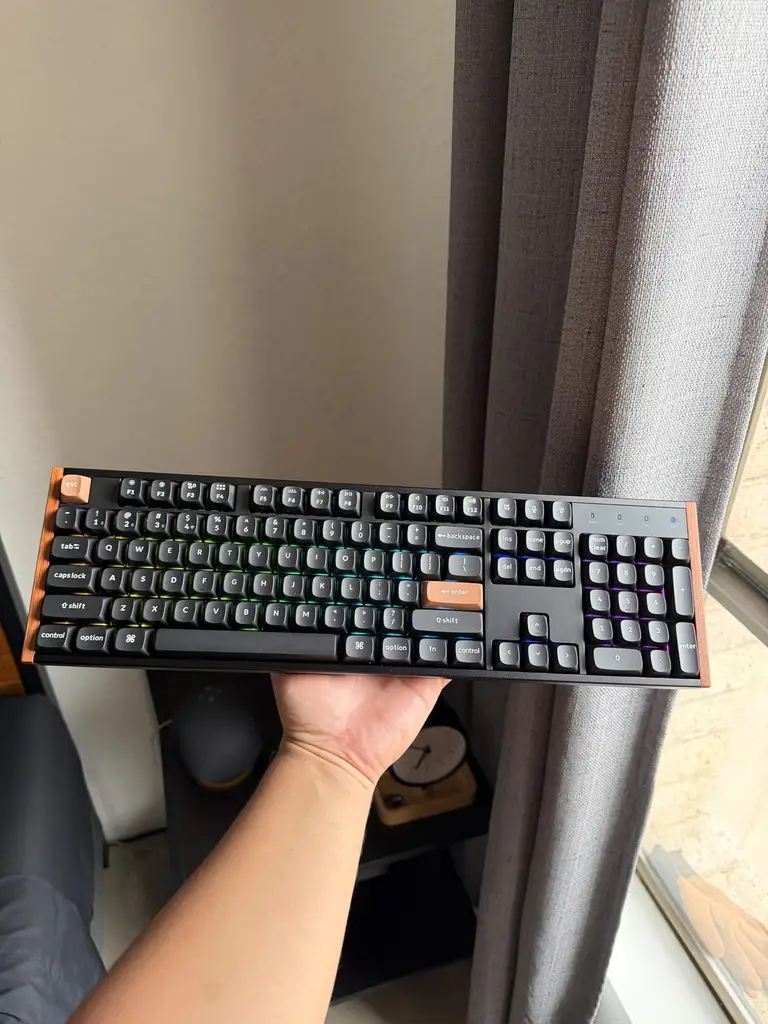
What Is the Keychron K10 HE?
The Keychron K10 HE is a full-size wireless mechanical keyboard featuring Hall Effect magnetic switches. It supports Bluetooth, 2.4GHz wireless connectivity and wired connections, making it suitable for different devices and setups.
One of its main attractions is its magnetic switch technology. Unlike conventional mechanical switches, these switches detect keypresses using magnets, allowing features such as adjustable actuation points and Rapid Trigger. This gives users more control over how the keys respond.
The keyboard also features customizable RGB backlighting, replaceable keycaps and configuration through Keychron’s browser-based Launcher software.
My Experience With the Keychron K10 HE
The first thing I noticed was how substantial this keyboard felt. It has a good weight to it, and the build quality gives the impression that you’re using something genuinely premium. It doesn’t feel cheap or flimsy, and that matters to me because I use my keyboard every day.
The typing experience is easily my favourite part. The keys feel wonderful, and the keycaps have a beautiful appearance. There’s no unpleasant looseness or sloppy feeling when typing. Everything feels satisfying, and I find myself enjoying the actual process of typing much more than I expected.
I know that sounds like a strange thing to say about a keyboard, but there’s something about the feel of these keys that makes working less mundane. Sometimes you just want to keep typing. If I’d discovered a keyboard like this earlier in life, I might have ended up becoming a professional typist!
The magnetic switches are another highlight. They provide that lovely springy response when pressing the keys, and the fact that their actuation can be adjusted makes the experience even better. I particularly like having that level of control over how the keyboard responds.
Connectivity has also been convenient. I can use Bluetooth, 2.4GHz wireless or a wired connection, so I’m not restricted to one way of connecting it to my computer.
Another thing I appreciate is the overall appearance. The keyboard looks good on my desk, and the backlighting adds to its appeal. It isn’t excessively loud either. You still get that satisfying clicky typing sound, but it hasn’t been unpleasant during my daily work.
There are a couple of things I would change, though. I’ve noticed that the backlighting sometimes changes modes on its own. It isn’t a major problem, but I would prefer it to remain on the setting I’ve selected unless I deliberately change it.
I also wish Keychron had a dedicated application for configuration. Instead, you have to access its Launcher through a web browser. It works, but I would find a desktop application more convenient than having to visit a website whenever I want to adjust settings.
Still, these are relatively minor complaints compared with how much I enjoy using the keyboard. I’ve had it for about three weeks now, and it has performed very well so far. I’ll have a better idea of its long-term performance as I continue using it.
Is the Keychron K10 HE Worth the Money?
I think it is. The build quality, typing experience and overall feel make this keyboard worth considering, particularly if you spend several hours a day working at a computer.
What stands out to me is that it doesn’t just look premium. It also feels premium when you’re actually using it. The magnetic switches, adjustable response and satisfying keycaps make a noticeable difference to the typing experience.
In fact, using this keyboard has made me curious about some of Keychron’s more expensive models. That’s probably a good indication of how much I’ve enjoyed it.
Would I Recommend the Keychron K10 HE?
Yes. Based on my experience so far, I would recommend it to anyone looking for a well-built full-size keyboard with a satisfying typing experience.
It is particularly appealing if you type frequently and appreciate being able to customize how your keys respond. The occasional backlighting issue and browser-based configuration aren’t ideal, but neither has been enough to take away from my enjoyment of the keyboard.
Alternatives to Consider
If you’re comparing keyboards, here are a few other options worth looking at:
- Keychron Q6 Max
- NuPhy Halo96 V2
- Logitech G915 X
Conclusion
The Keychron K10 HE has been an excellent addition to my workspace. It feels solid, looks beautiful and makes typing much more enjoyable than I expected. The magnetic switches and adjustable response are particularly impressive, and I appreciate having multiple connectivity options.
I still have a few minor complaints, but they don’t change my overall opinion. After three weeks, I’m very happy with this keyboard, and I can see myself exploring more of what Keychron offers in the future.
Also read my similar review of the Zebronics PixaPlay 73